
• Skip to primary navigation
  • Skip to content
  • Skip to footer
App Development Journey Learning and Sharing
  • Home
  • Apps
  • Start Here
  • Resources
  • About
    1. Home
    2. /
    3. How to show gridlines in Word Mac 2011
    Ravi Shankar

    Ravi Shankar

    Apple Platforms Developer

    • App Nomad
    • Email
    • Twitter
    • GitHub
    • LinkedIn

    How to show gridlines in Word Mac 2011

    less than 1 minute read

    On this page

    We had already seen how to show gridlines in Word 2010. Similarly there is an option available to display the gridlines in Word for Mac 2011.

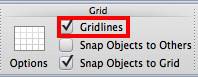
    Launch Word Mac 2011 and click the Layout menu and then navigate to Grid section.
    201109241512.jpg

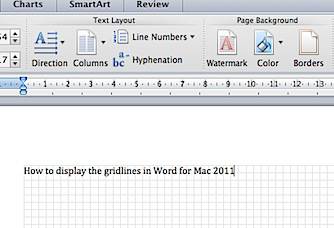
    Now tick the check box with label as Gridlines to display the gridlines in the Word document.
    201109241516.jpg

    Updated: September 24, 2011

    Twitter Facebook LinkedIn
    Previous Next

    You May Also Enjoy

    I Built 3 AI Tools for Indie Devs in 3 Days (No Backend Required)

    16 minute read

    Here’s the indie developer paradox I live with: I can build complex iOS apps with Core Data, CloudKit, HealthKit integration—the whole nine yards. But when ...

    From Xcode to No Code: Building AI Apps with Google AI Studio

    10 minute read

    I’ve spent years building iOS apps in Xcode. Compiling, debugging, wrestling with provisioning profiles, waiting for App Store reviews. It’s a process I know...

    Building TwAIst: An AI Twitter Assistant with Chrome’s Built-in AI

    13 minute read

    How I built a privacy-first AI Twitter assistant using Chrome’s built-in AI - and what I learned about the Prompt API along the way I built TwAIst for the G...

    How ChantFlow Transforms Your Apple Watch into a Sacred Digital Mala

    5 minute read

    Discover how this spiritual wellness app uses Apple Watch complications to make 108 mantra practice a natural part of your daily routine See the app here: C...

    • Twitter
    • GitHub
    • LinkedIn
    • Feed
    © 2025 Ravi Shankar. Powered by Jekyll & Minimal Mistakes.