
What is Design Thinking? A Developer’s Introduction
When I first heard “design thinking,” I thought it was something only designers needed to worry about. I’m a developer. I write code. Why would I need a design process?
Then I started paying attention to user feedback. And everything changed.
The Simple Version
Design thinking is just a fancy way of saying: talk to your users before you build stuff.
That’s it. Instead of guessing what features people want, you ask them. Instead of assuming you know the problem, you watch how people actually work. Then you build something based on what you learned.
It sounds obvious when you put it that way. But most of us skip this step. We get an idea, we build it, and then we wonder why nobody uses it.
Where This Came From
Back in the 1990s, a design company called IDEO became famous for solving problems differently. They didn’t start with solutions. They started by watching people.
Their most famous project was redesigning the shopping cart for ABC News. Instead of sitting in a room sketching cart designs, they went to grocery stores. They watched shoppers. They talked to store employees and cart mechanics.
They discovered problems nobody in a conference room would have thought of:
- Carts get stolen
- Kids fall out of them
- The wheels get stuck
- People lose their stuff in the bottom
The cart they designed looked nothing like what they would have built without that research.
Stanford later created a program to teach this approach. They called it the d.school. Tim Brown, IDEO’s CEO, wrote a book called “Change by Design” that spread these ideas to businesses everywhere.
The Five Steps
Design thinking has five stages. They’re not strictly linear - you’ll jump back and forth.
1. Empathize - Talk to users. Watch them work. Understand their problems.
2. Define - Figure out what problem you’re actually solving.
3. Ideate - Come up with lots of possible solutions.
4. Prototype - Build something quick and rough to test your ideas.
5. Test - Put it in front of real users. See what happens.
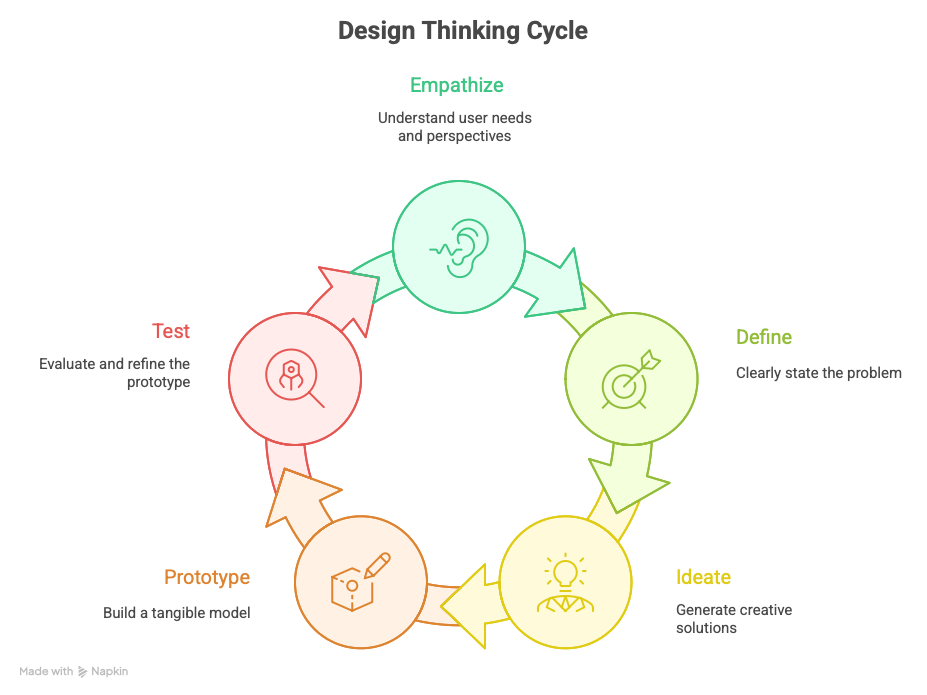
The magic is in the first two steps. Most developers skip straight to building. Design thinking forces you to slow down and make sure you’re building the right thing.
Real Examples from My Apps
Let me show you how this works with two apps I’ve built.
Expense Split
When I first built Expense Split, it did one thing: split bills equally among friends. Simple math. Done.
But then the feedback started coming in.
Users wanted custom splits. Equal splitting doesn’t work when one person orders an expensive steak and everyone else gets salads. They needed to assign different amounts to different people, not just divide by the number of heads.
They also wanted charts. They wanted to see where their money was going over time. Who usually pays? What categories eat up the most cash? The numbers alone weren’t enough - they needed to visualize the patterns.
I didn’t think of these features. Users told me they needed them. And once I added them, reviews improved and people actually stuck with the app.
That’s design thinking in practice. Listen. Learn. Build what people actually need.
Ease Eyes
Same thing happened with Ease Eyes, my macOS app for eye strain prevention.
The app follows the 20-20-20 rule: every 20 minutes, look at something 20 feet away for 20 seconds. Simple concept.
But users had problems I didn’t anticipate.
They needed a pause timer. Sometimes you’re in the middle of something important - a presentation, a video call, deep focus work. You can’t just stop and stare out the window. Users needed to pause the reminders without completely disabling the app.
They also wanted custom break intervals. Not everyone works the same way. Some people wanted reminders every 15 minutes. Others preferred every 30. The fixed 20-minute interval I built didn’t fit everyone’s workflow.
Again, I learned this from users. Not from sitting in my office imagining what might be useful.
Why Developers Should Care
You can write perfect code. Clean architecture. Full test coverage. And still build something nobody wants.
Technical skills get you halfway there. Understanding what to build gets you the rest of the way.
Design thinking helps you:
- Build fewer features - Because you know which ones actually matter
- Get better reviews - Because you’re solving real problems
- Waste less time - Because you validate ideas before writing code
- Feel more confident - Because you have evidence, not just hunches
Getting Started
You don’t need to become a design expert. Just start with these habits:
Read your reviews. Seriously. People tell you exactly what they want and what frustrates them. It’s free research.
Watch someone use your app. Don’t help them. Don’t explain things. Just watch. You’ll see where they get stuck.
Ask “why” more often. When someone requests a feature, ask why they need it. The underlying problem might have a better solution than what they’re suggesting.
Build less, learn more. Before adding a feature, ask yourself: do I have evidence that people need this? Or am I just assuming?
The Bottom Line
Design thinking isn’t complicated. It’s just the discipline of understanding people before building for them.
I wish I’d learned this earlier. It would have saved me from building features nobody used, from apps that solved problems nobody had, from code that was technically excellent but practically useless.
Your users know things you don’t. Design thinking is just a structured way to learn from them.
Related: Check out Expense Split and Ease Eyes on the App Store - both shaped by user feedback and design thinking principles.
Need iOS Help?
I help developers with:
- Bug fixes & debugging
- App Store rejections
- Code review & mentoring
- Claude Code training for iOS
10+ years iOS • 10+ published apps • 11,000+ students trained