
Remove Apple Mach-O Linker directory not found
Listed below are the steps to remove Apple Mach-O linker warning directory not found warning message.

1. Navigate to Project Navigator, select the Project then navigate to Build Settings.

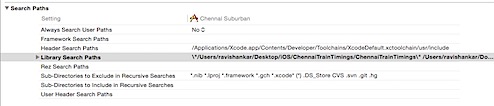
2. Under Build Settings, scroll down to Search Paths and double click on Library Search Paths.
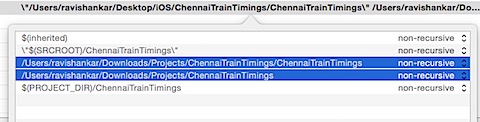
3. Select the missing folder paths and remove them using “-“ sign.
Need iOS Help?
I help developers and founders with:
- New apps — idea to App Store
- Bug fixes, debugging & rescue
- App Store rejections
- Code review & mentoring
10+ years iOS • 10+ published apps • 11,000+ students trained