
How to convert Keynote slides in to images
This article is about the feature that allows Apple Keynote users to convert the slides in to .PNG, .JPEG and .TIFF image files.
Step 1: Launch the Keynote App and open the Keynote presentation
Step 2: Click File menu and select Export from the menu list.

Step 3: Navigate to Images section and select the Slides that needs to be exported to images.
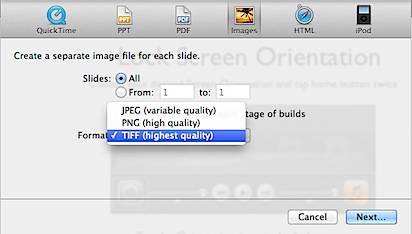
You have the option to specify all slides or range of slides. Similarly you are allowed to select the image format (JPEG, PNG, TIFF) from the drop down. After specifying the required details, click the Next button.
Step 4: Then click the Export button after providing a name and location for the images.

Need iOS Help?
I help developers and founders with:
- New apps — idea to App Store
- Bug fixes, debugging & rescue
- App Store rejections
- Code review & mentoring
10+ years iOS • 10+ published apps • 11,000+ students trained