
How to disable code completion suggestion in Xcode
Xcode is one of the powerful IDE for IOS development and by default it supports code completion suggestion. Code completion feature suggests users with possible code substitution when you start typing first few letters of code in Xcode editor.
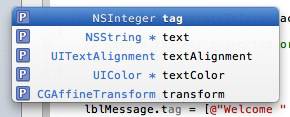
For example, if you have UILabel reference variable and start typing “t” after the dot then the above code completion popup will be displayed. Now you can quickly pick up your desired attribute from the list.
In case if you do not prefer the code suggestion and find it more annoying then you can disable this option using the Xcode Preferences.
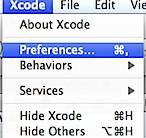
Click the Xcode menu and select Preferences from the menu list.
In the Preferences window, navigate to Text Editing Preferences then Code Completion under the Editing section.
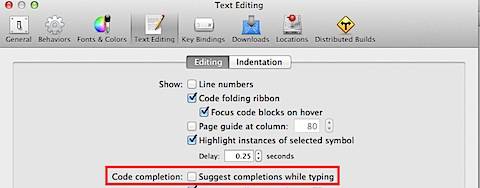
Unmark the check box with caption as “Suggest completion while typing”. This should turn off the code completion feature in Xcode.
Need iOS Help?
I help developers and founders with:
- New apps — idea to App Store
- Bug fixes, debugging & rescue
- App Store rejections
- Code review & mentoring
10+ years iOS • 10+ published apps • 11,000+ students trained